The DJI RC 2 flies fewer drones than you think, and the list is not printed on the box you already own
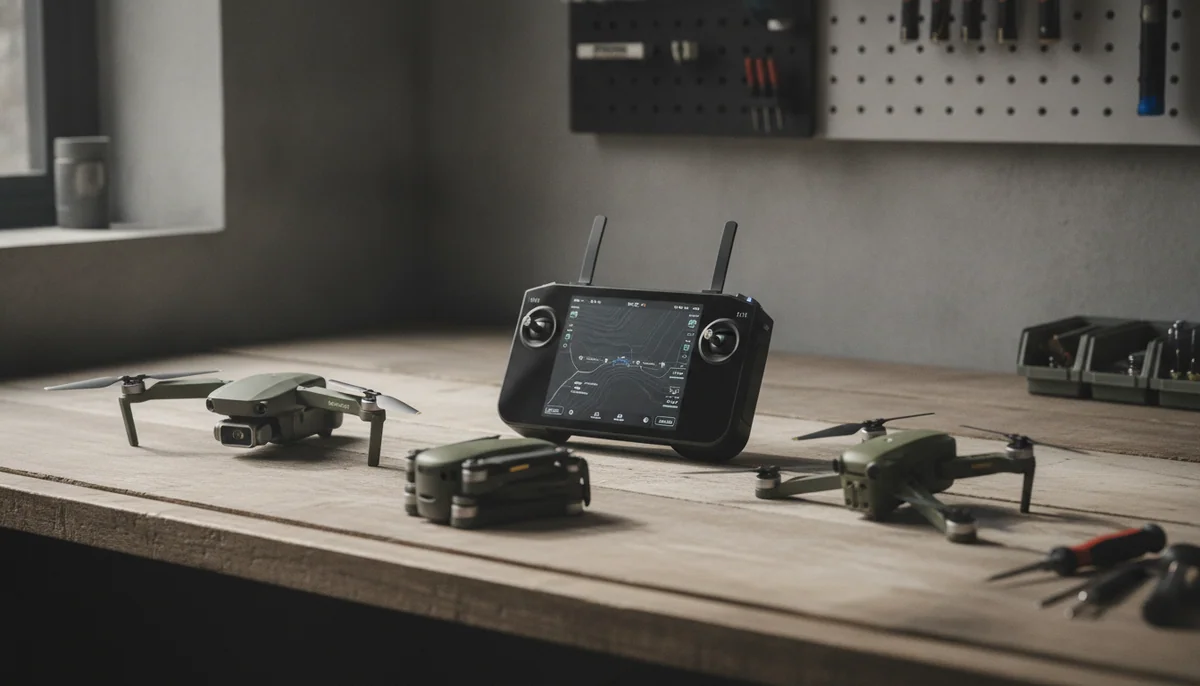
The short answer, straight off DJI's own listing for the controller: the RC 2 is sold as compatible with the DJI Flip, the DJI Mini 4 Pro, the DJI Air 3, the DJI Air 3S and the DJI Neo. It is a 420-gram unit with a 5.5-inch full-HD screen rated at 700 nits, four antennas in a 2T4R arrangement with two of them folding out of the top, an eight-core processor, roughly 21GB of usable storage, and the DJI Fly app already installed so you can power on and launch without a phone anywhere near you.
That bullet list is also wrong, in the specific way that stale marketing copy is wrong. The Mavic 4 Pro Fly More Combo ships an RC 2 in the box and is not named on it. The Avata 360 sells in two RC 2 configurations and is not named on it either. Both aircraft arrived after the controller's listing was written, and nobody went back to update the sentence. So the compatibility question has two halves that people keep collapsing into one: which drones ship with an RC 2, and which drones an RC 2 you already own will bind to. The first list is longer than the bullet. The second is shorter than buyers hope.
- Buy the RC 2
- as the controller variant of whichever drone you were already buying, because on every aircraft that offers the choice, the screen is the thing owners say they would not go back on.
- Do not buy the RC 2
- as a standalone purchase intended to outlive the drone, unless it is a straight replacement for one you broke or a second unit for a drone already on the list above.
- Think carefully
- if you fly somewhere new every weekend, because this controller has no connection of its own and your maps have to be downloaded before you leave the house.
What is in which box, and what your existing controller will bind to
Quadcopter Bench put the eight aircraft we have written about side by side against their own listings rather than against DJI's compatibility bullet, because the listings are the thing that actually turns up at your door.
| Aircraft | Controller in the box | RC 2? |
|---|---|---|
| DJI Flip | RC-N3, RC 2, or RC 2 with three batteries | Yes, and it is named on the controller's own list |
| DJI Mavic 4 Pro Fly More | RC 2 | Yes, though the Creator Combo swaps it for an RC Pro 2 |
| DJI Avata 360 | RC 2, or goggles with an RC Motion 3 | Yes, and the RC 2 version is the one you can fly alone |
| DJI Air 3S, Air 3, Mini 4 Pro, Neo | Varies by bundle | Yes, all four are named by DJI |
| DJI Neo 2 | RC-N3 plus a bolt-on digital transceiver | Not something this record settles, so buy the configuration you intend to fly |
| DJI Mini 3 | The original DJI RC | No, and the two controllers look almost identical |
| DJI Avata 2 | Goggles with an RC Motion 3 | No, this aircraft talks to goggles and stick controllers only |
| Potensic Atom 2 | Phone clamp, or the PTD 1 screen controller | No, and the PTD 1 does not fly anything else either |
The Mini 3 line is the one that costs people money. Its Fly More Combo ships what DJI calls the new DJI RC, with the Fly app preinstalled and a built-in 5.5-inch display, which is the same sentence you would write about an RC 2 if you were not paying attention. They are different generations of radio wearing nearly the same body, and the RC 2's compatibility list does not include the Mini 3. If your plan was to buy a controller once and change aircraft around it, that plan fails at the first hurdle, and our Mini 3 review says the same thing from the aircraft's side.
RC 2 against RC-N3: the same drone, two completely different evenings
The RC-N3 has no screen. It clamps your phone between the grips and uses that as the display, with cables for iPhone and Android supplied, and on the Neo 2 it arrives alongside a digital transceiver module that mounts onto the aircraft to carry the video link at all. It is cheaper, it is lighter, and it is the reason plenty of people never get around to flying.
The Flip is the cleanest test of the two, because DJI sells the identical aircraft with either one, plus a drone-only box that assumes you already own a controller and which a first-time buyer should never click. Owners who paid the difference do not hedge about it: the advice that keeps appearing in the Flip's own review set is to get the RC 2 and that it is far better than a phone or a screenless controller, with the built-in display singled out as staying legible in direct sun. The same conversion story runs through the Mini 3's screen-controller bundle, where one owner writes that he was certain paying for a screen was a bad idea and could not have been more wrong. What they are describing is not picture quality. It is the disappearance of a ritual: no cable, no clamp, no app launch, no phone battery, no incoming call landing on top of a live feed.
The honest case for the RC-N3 is thinner but real, and it has nothing to do with money. Your phone is always online and the RC 2 never is. Maps have to be preloaded, and they download in tiles small enough that one Flip owner gave up trying to work out which parts of his area he actually had cached, and concluded he would rather carry a cheaper controller tethered to a device with a live connection. If you fly the same three fields, that is nothing. If you drive somewhere unfamiliar most weekends, it is a chore you will perform on your kitchen table every Friday night. The broader version of this argument, phone against controller, is its own piece.
One thing the RC-N3 does buy you that the marketing skips: on the Neo 2 the controller is what unlocks the camera, with an owner noting that adding it opens up settings such as 4K at 100fps that hand and phone flying leave locked away. Screen or no screen, a real controller is a camera upgrade as much as a flying one.
RC 2 against RC Pro 2: read bullet seven, then read bullet eight
The Mavic 4 Pro Fly More Combo has the most confusing listing in DJI's range, and the confusion is exactly about this controller. Bullet seven promises a seven-inch rotatable high-bright RC Pro 2 that collapses for carry. Bullet eight says the box contains a DJI RC 2. The title says RC 2. The description resolves it: the RC Pro 2 belongs to the 512GB Creator Combo, alongside ALL-I 4:2:2 encoding, a 240W adapter and a parallel charging hub. DJI pasted one bullet block across three variants of the same aircraft and left the wrong controller standing in it.
So the real difference between the two controllers is not a feature list, it is which box you buy and what else comes with it. The RC 2 is a 5.5-inch 700-nit panel; the RC Pro 2 is a seven-inch high-brightness screen that folds down for transport. An owner of this exact combo puts the trade plainly in his own review: taking the standard radio saves money, and the enhanced Pro version adds features you may find useful, so do the homework before buying rather than after.
Our position is narrower than his. Screen size alone does not justify the step up, because the image coming off the aircraft is the same either way. The codec does. If a client deliverable specifies 4:2:2, no controller purchase gets you there and the Creator Combo is the only box that does, which we work through in the Fly More against Creator Combo comparison. For everyone else, the RC 2 combo is the sane one, and the money saved is better spent on the fact that this aircraft has no manufacturer accident cover behind it in the US.
Where the RC 2 stops: goggles, FPV, and a naming trap worth knowing about
The Avata 2's compatibility bullet lists DJI Goggles 3, Goggles N3, Goggles 2, Goggles Integra, RC Motion 2, RC Motion 3, FPV Remote Controller 2 and FPV Remote Controller 3. The DJI RC 2 is not on it and never will be, because an FPV aircraft sends its picture to a headset rather than to a screen in your hands.
Now the trap. "DJI FPV Remote Controller 2" and "DJI RC 2" are two different products with almost the same name, and only one of them flies an Avata. The FPV controller is the stick unit that unlocks manual flight for goggle pilots, and Avata 2 owners buy it separately after discovering the motion wand in the box cannot do rate mode; one wrote that he bought the stick controller specifically to fly manual and wished DJI had shipped it instead of the wand. If you are shopping from a forum thread rather than a product page, read the model name twice.
The Avata 360 is the exception that makes the whole distinction useful. DJI sells it three ways, and two of them pair it with an RC 2 rather than goggles. That matters more than it sounds: with a screen controller you fly line of sight, on your own, and in most places goggle flight legally requires a second person standing next to you as a spotter. For a solo creator that is not a compromise, it is the reason to pick the RC 2 configuration. The RC 2 is not a goggles link, though, so if you buy that version and later want the immersive experience, you are buying a motion controller as well as the headset. The two Avatas are a genuine fork rather than an upgrade path, and the wider field is in our FPV shortlist.
The screen controller that flies exactly one drone
It is worth stepping outside DJI for a moment, because it sharpens what the RC 2 is actually good for. Potensic's PTD 1 is a fine piece of hardware, a 5.5-inch 1080p touchscreen at 700 nits with a claimed three hours of runtime, and the Atom 2's own listing carries a note in bold telling you it is compatible with the ATOM 2 and nothing else. Not the older Atom, not the newer one. Owners of the bundle rate it highly and call it the reason they can finally see what the aircraft is doing.
Set against that, the RC 2's short list starts to look generous. Buy one with a Flip and it will still fly the Air 3S you buy in two years. Buy a PTD 1 and it dies with the drone it came with. That is the real argument for staying inside a controller ecosystem, and it is a better argument than any spec on either box. The countervailing case, that Potensic gives you more aircraft for the money, is an argument we have run at length.
So which box should you actually buy
Everything above is only useful if it lands on a purchase, so here is where each of these ends up, with the fault attached to each one rather than buried underneath it.
The RC 2 on its own is worth buying as a replacement or a second unit if you already fly something on its list, and it is a poor speculative purchase, because the screen is only mid-bright at 700 nits, there is no connection of its own for maps, and it will not bind to a Mini 3, an Avata 2 or anything that is not a DJI.
The DJI Flip with the RC 2 and three batteries is the most sensible package in DJI's cheap tier for a first camera drone, and the reason to walk away is legal rather than technical: it does not broadcast Remote ID, so it is the wrong aircraft the moment anyone pays you to fly, and its caged propellers act like sails in wind well below the rating on the box. Our full Flip review works through both.
The DJI Neo 2 with the RC-N3 is the best follow-camera here and the controller is what turns range from the limiting factor into a non-issue, but the nineteen minutes on the listing is not a number anyone achieves, with owners reporting ten to fifteen instead, which is why only the three-battery configuration makes sense. That argument is laid out in the Neo 2 review, and against the Flip in the head to head.
The DJI Mini 3 Fly More Combo remains a genuinely good buy for landscape and travel work and its screen controller is the reason to pick that variant, as long as you accept two permanent absences: it has no forward or sideways obstacle sensing at all, and it cannot track a moving subject in any mode.
The Mavic 4 Pro Fly More Combo is the strongest camera in this list and the right combo for most buyers of it, and the drawback is not the aircraft: US owners cannot buy DJI's accidental damage cover for it, and the codec you may need for client work is locked to the other box.
The Avata 360 with the RC 2 is the only drone here that all but guarantees you came home with the shot, and the price of that is resolution, because a normal-looking crop out of that 8K sphere resolves closer to 2.5K than to 4K, and every clip has to pass through DJI's own software before it becomes footage. Our review is blunt about who that suits.
The Avata 2 Fly More Combo is still the gentlest way into goggle flying that anyone has built, and it is a fifteen-minute aircraft with no forward obstacle avoidance whose true manual mode needs a stick controller that is not in the box. The long version is here.
The Potensic Atom 2 with the PTD 1 is the credible non-DJI screen-controller option and a good aircraft bought at a discount, with two faults you should price in: it has no forward or side obstacle avoidance to go with its tracking modes, and the controller flies that drone and nothing else. Our review is where the price argument lives.
One last piece of housekeeping that applies whichever way you go. If you are buying a bundle rather than an aircraft, the three-battery kits on the Flip, the Neo 2 and the Avata 360 are all cases where the extra packs are the working configuration rather than an upsell, which is not true across the board and which we argue both ways in the Fly More Combo piece. And if you are in the US, check what is currently importable before you commit to any of it, because that picture keeps moving.
Frequently Asked Questions
Which drones does the DJI RC 2 actually fly?
DJI's own listing names the Flip, Mini 4 Pro, Air 3, Air 3S and Neo, and the Mavic 4 Pro and Avata 360 both ship with one despite arriving too late to appear on that bullet.
Will an RC 2 work with a DJI Mini 3?
No, the Mini 3 combo ships the original DJI RC and the Mini 3 is absent from the RC 2's compatibility list, which catches people out because the two controllers look nearly identical.
What is the difference between the RC 2 and the RC-N3?
The RC 2 has its own 5.5-inch screen and the Fly app preinstalled, while the RC-N3 has no screen and clamps your phone in to act as the display.
Is the RC Pro 2 worth having instead of the RC 2?
Only if you need what travels with it, since on the Mavic 4 Pro the RC Pro 2 belongs to the Creator Combo along with the 512GB storage and ALL-I 4:2:2 encoding that no controller purchase can add later.
Can I use the RC 2 with DJI's FPV goggles?
No, goggle flight needs a motion controller or an FPV stick controller, and the RC 2 is a screen controller that cannot stand in for either.
Does the RC 2 fly the DJI Avata 2?
No, the Avata 2's compatibility list covers the Goggles and RC Motion families plus the FPV Remote Controllers, which are a different product from the DJI RC despite the similar name.
Will an RC 2 control a Potensic or any other non-DJI drone?
No, and the reverse is worse, since Potensic's own PTD 1 screen controller is compatible with the Atom 2 alone.
Do I need to prepare anything before flying somewhere new with an RC 2?
Yes, download your maps at home, because the controller has no internet connection of its own and owners find the tile-by-tile downloads hard to keep track of in the field.
Should I buy the controller separately or as part of a drone bundle?
Buy it in the bundle, because the standalone purchase only pays off as a replacement or spare for a drone already on its compatibility list.