The Atom 2 arrives one part short of flyable, and most of the rest of its aftermarket is noise
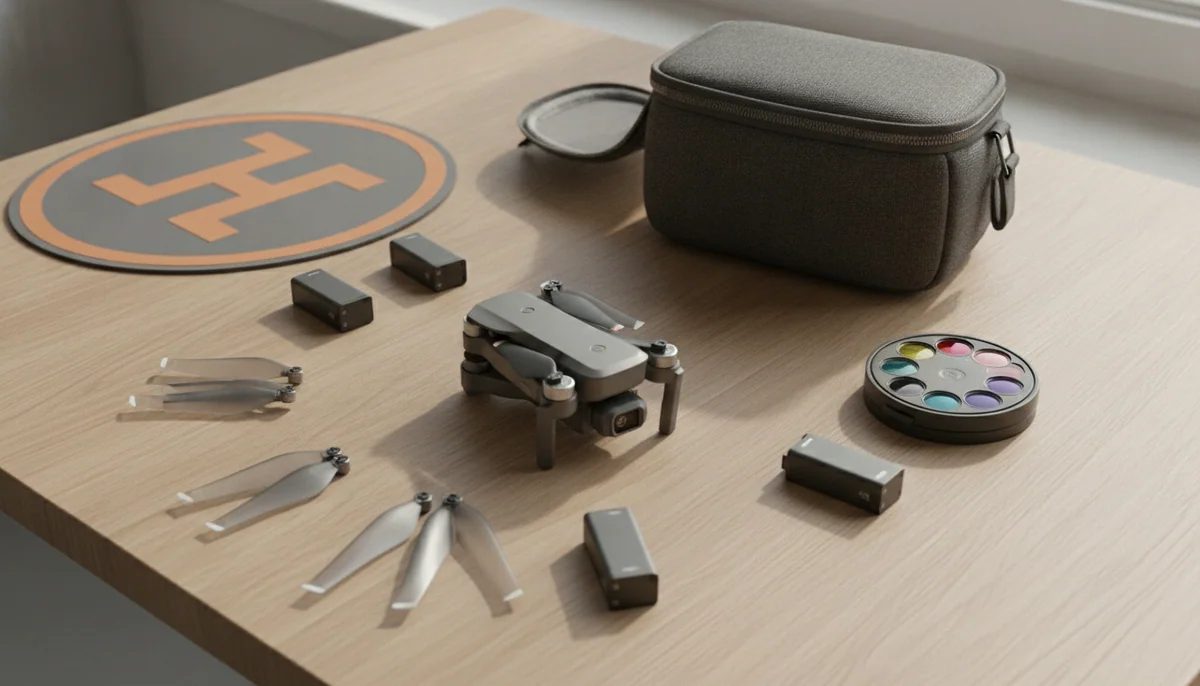
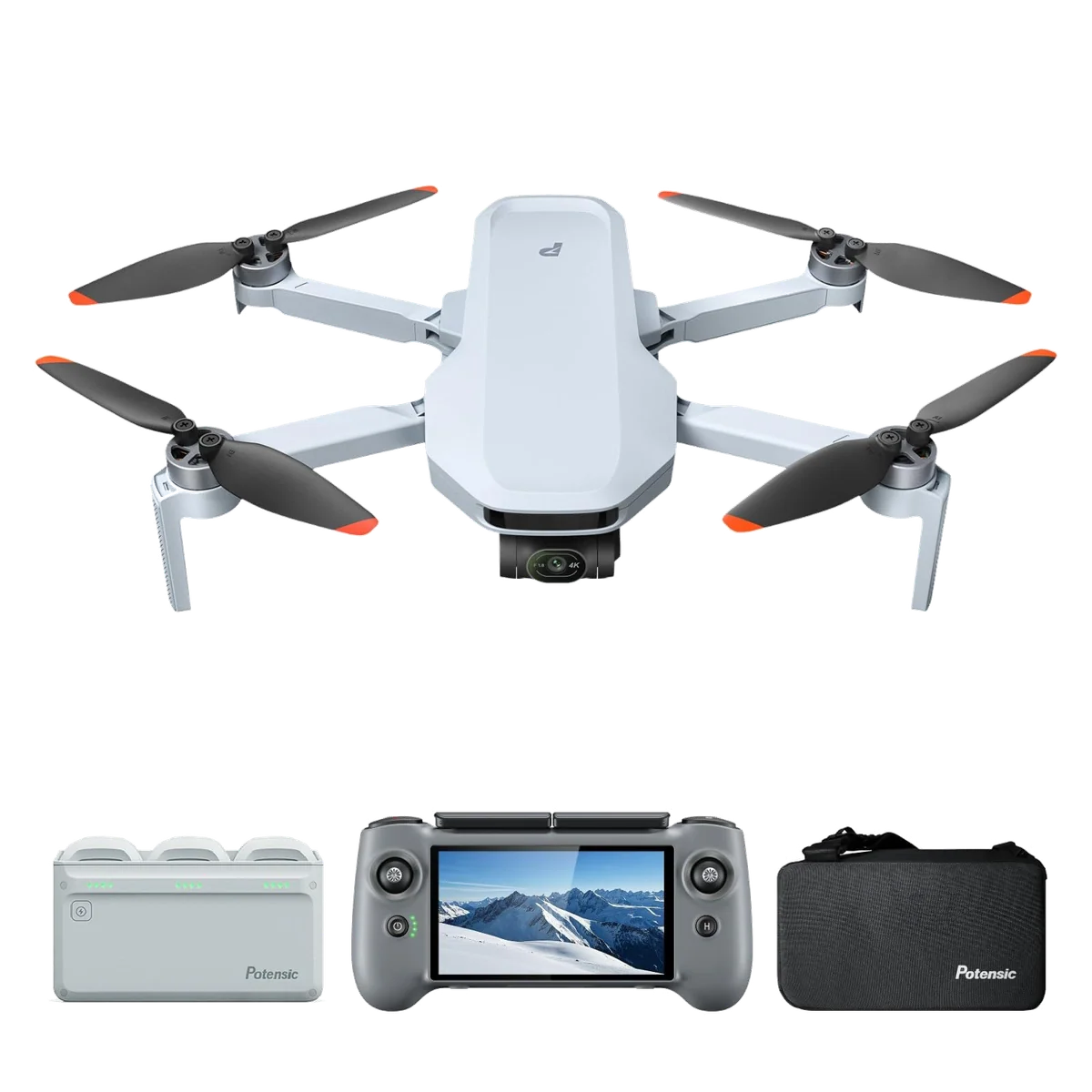
Most accessory guides exist because the manufacturer sold you a bare airframe. This one does not. The Fly More Combo with the PTD 1 already contains three batteries, a hub that charges all of them together, a shoulder bag and a controller with a screen in it, which is the shortlist that eats the budget on every other drone in this class. That makes the honest version of this article shorter and blunter than the ones that pad out a list with lanyards. There are two purchases that change what the drone can do, two more that depend on where you fly, and a category of accessory that quietly costs you the legal advantage you bought the thing for.
Start with the drawback, because it sets the ceiling on everything below. The Atom 2 has no forward, side or upward obstacle sensing, and the downward vision system is nominal enough that a careful reviewer flying low over uneven ground could not detect it doing anything at all. Video is locked to 4K at 30fps and the 48MP stills the listing prints as 8K are JPEG only. No filter, card, pad or cable improves any of that. Quadcopter Bench rates this drone highly when it is bought well and poorly when it is bought at the top of its range, and the full argument lives in our review of this exact bundle. Accessories are for making a good aircraft usable, not for arguing with its spec sheet.
The memory card is not an accessory, it is a missing part
Nothing records without one, and none is supplied. That is normal for the category and still catches people, because a combo box this full reads as complete. The part that catches people twice is that a cheap card does not merely fill up slowly, it stops the drone filming: two separate reviewers hit an on-screen warning that the card could not keep up and had to drop from 4K to 2.7K to carry on shooting.
The requirement on paper is undemanding. Video tops out around 80Mbps, which is ten megabytes a second, well inside what any modern card claims. What fails is cheap cards that cannot sustain what they claim, and counterfeit cards that never could. Buy a V30 from a brand with a warranty behind it and the problem does not exist.
Buy it larger than you think you need, for a reason specific to this airframe: the card slot sits behind the battery, so changing cards means pulling the pack out first. On a drone with three batteries and an hour of flying in the bag, you want to insert one card in the morning and never think about it again. A card you swap in the field on this drone is a card you will eventually drop in the grass.
A variable ND is the only accessory that changes the footage
This follows directly from the 30fps cap. To get natural motion blur you want a shutter around 1/60, and on a bright day at f/1.8 that is several stops beyond what the sensor will tolerate. Without a filter your options are to let the drone pick a fast shutter and accept video with a slightly stuttering, over-crisp quality to it, or to lose the manual exposure control that is one of the genuinely serious tools on this machine. An ND buys back the shutter speed. It is the difference between footage that looks like a drone shot and footage that looks like a camera shot.
The awkward history here is worth knowing before you shop. At launch there were no first-party ND or polarising filters at all, which pushed early owners into cranking the shutter or retrofitting filters cut for other manufacturers' drones, and retrofits on a gimbal this small are a poor idea because the mass sits on the pitch axis. Potensic's own variable ND arrived later and is the version to want. A CPL is the secondary purchase, not the primary one: it does something an ND cannot, cutting glare off water and glass, but it does not solve the shutter problem, and stacking a CPL onto a drone gimbal for the sake of it is weight you do not need.
| Accessory | Buy it when | Skip it when |
|---|---|---|
| Fast V30 memory card | Always, before the first flight, sized so you never swap it | Never |
| Variable ND filter | You shoot video in daylight and care how motion looks | You only take stills, or only fly at dusk |
| Landing pad | You fly from dirt, sand, gravel or crop stubble | You launch from mown grass, decking or your own hand |
| USB-C extension cable | You genuinely intend to fly the phone-clamp controller off a tablet | You bought the PTD 1, which already has the screen |
| Spare propellers | You are learning, or you fly far from home | Nothing here; they are the cheapest insurance on the list |
| Fourth battery | Rarely, and only if you accept it charges after the other three | Almost always, because the hub does three at a time |
| Propeller guards | You fly indoors and 249g is not a legal line for you | You bought this drone specifically to stay under the threshold |
| Extended coverage plan | Before the purchase window closes, if this is your first drone | You already carry liability and hull cover elsewhere |
Anything you bolt on costs you the 249 grams
The Atom 2 weighs exactly 249g. Not comfortably under, not nominally under: exactly at the line, which is the entire reason it sits outside US recreational registration and carries Remote ID as a toggle rather than a forced broadcast. Every gram you attach to the airframe is a gram over. Propeller guards are the obvious offender and landing gear risers are the quiet one, and both are sold cheerfully to people who bought this drone precisely because it stays under the number.
That is a decision, not a prohibition. If you fly indoors, in a gym or a warehouse, guards are a sensible trade and the weight class is irrelevant to you. If the sub-250g status is why the Atom 2 was on your list in the first place, understand that a set of guards converts it into an aircraft with the same obligations as something twice its size, and read what registration and Remote ID actually require before you fit them. A filter is a marginal case on the same principle, which is a genuinely irritating tension in the design and one nobody selling filters mentions.
The cheaper answer to most of what guards and landing gear are meant to solve is a landing pad. It keeps grit out of the gimbal and off the downward sensor on takeoff, it gives the drone a high-contrast target to come back to, and it costs nothing in weight because it stays on the ground. That matters more here than on a DJI, because return to home on the Atom 2 lands accurately rather than precisely, somewhere in the region of half a metre from where it left. A pad is not going to fix that, but it does mean the thing it lands on is flat and clean.
The cable is a design fault, and you can only buy your way around it
This one has followed the Atom line across two generations. The cable supplied with the phone-clamp controller is proprietary and roughly an inch too short to reach a tablet's socket, and because it is a one-piece cable with a non-standard end, a third-party replacement will not substitute for it. The only fix is an extension, which means a dangling adaptor on a controller you are holding above your head.
If you bought the PTD 1 bundle, none of this applies to you, and that is a real part of what the screen controller is worth. If you are still choosing between them, the trade-off is laid out in our piece on flying off a phone versus a real controller. What the PTD 1 does not solve is the screen itself: at 700 nits it is mid-pack, there is no live histogram to check exposure against, and Potensic moved to 900 nits on the follow-up controller, which tells you where they thought the weakness was. A sunshade would be the obvious purchase and no factory one exists, so anything you fit is cut for another manufacturer's controller and measured by you.
The accessories already inside it, which cost nothing
Before spending anything, update the firmware, because two of this drone's better features were not in the box at launch. The flat P-Log profile arrived afterwards, and waypoints turned into a public row that ended with the company shipping them anyway. One caveat if colour work is why you are here: the log footage is 8-bit, which is a weak base for heavy grading, and the listing does not tell you that.
Two more things nobody sells you. The panorama comes out as a 12MP file, but the individual source frames are written to the card, so you can pull them off and stitch a full-resolution version yourself in software you probably already own. And there is a defog mode buried in the camera settings that earns its keep on humid days, which the app itself warns you to switch back off, because it costs clarity when there is nothing to cut through. What does not exist is a third-party flight app: there is no Litchi equivalent for this drone, so the native waypoint mode is the whole of your automation.
Coverage is the accessory people forget until they need it
The most consistently praised thing about Potensic anywhere in the record is not the hardware, it is what happens when you break it. One owner snapped an arm and wrecked the gimbal through his own admitted error, worked through a fortnight of slow, timezone-lagged email, and was sent a replacement drone. Another missed the window to buy the extended plan and had support manually reopen it for him. That plan replaces the drone several times over a two-year term, and the window to buy it is short and tied to the purchase, which is why it belongs in an accessory list rather than a footnote.
It is not insurance. It covers your drone and not the greenhouse it lands in, and if you fly anywhere with people or property below, that is the cover you actually need; we have written separately about insuring a drone now that DJI's own scheme has gone from the US. Given that this aircraft has no forward obstacle sensing and its most heavily marketed feature is one that sends it chasing a moving subject, the case for buying replacement cover is stronger here than on a drone that can see. What avoidance catches and what it flies through is worth reading alongside this.
What to leave on the shelf
The old Atom's carry case, first. The batteries and the charging hub carry over from the previous 3-axis Atom, which is genuinely useful and widens the pool of spares available to you, but the PTD 1 is bigger and heavier than the controller it replaces and the older case will not close around it.
The PTD 1 itself, second, if you are thinking of it as a platform investment. Potensic states in its own listing that it works with the Atom 2 and nothing else, and that includes the company's own successor, which shipped with a different controller. Buy it because you want a screen in your hand this year, not because you expect to carry it forward; if the newer model is on your mind at all, we work the trade through at Atom 2 vs Atom 3.
And a fourth battery, in most cases. The hub charges three at once in about an hour and twenty minutes by Potensic's figure, so a fourth pack sits out that cycle and waits. Three batteries is roughly an hour to seventy minutes of real flying rather than the 96 minutes on the carton, and the thing that usually ends a session is light, wind or the pilot rather than the last cell. If you want the fuller version of that arithmetic, it is why the box number is several flights added together, and the wider case for the bundle is its own piece.
The verdict at the top holds. A card and an ND are the purchases that change what this drone does; a pad and spare props are cheap enough not to argue about; everything else is either conditional on how you fly or is buying weight, and the aftermarket around this aircraft is still thin enough that patience beats improvisation. If you are reading this before you have bought the drone rather than after, our shortlist of camera drones that stay under the registration weight and the longer answer to whether Potensic really matches DJI are the two pages to read next.
Frequently Asked Questions
What size memory card should I put in it?
Large enough that you never have to change it, because the slot sits behind the battery and swapping cards in a field is how cards get lost.
Does a slow card really matter on a 4K drone?
Yes, because a card that cannot sustain its rated speed triggers an on-screen warning and forces you down to 2.7K to keep recording at all.
Do I actually need ND filters?
If you shoot video in daylight and want motion to look natural at the drone's fixed 30fps, an ND is the single accessory that changes your footage.
Will filters cut for another manufacturer's drone fit?
Early owners retrofitted them out of necessity and reported poor fit, and hanging unsupported mass on a gimbal this small is a bad trade now that Potensic makes its own.
Are propeller guards worth fitting?
Only if you fly indoors, because the drone sits at exactly 249g and any guard puts you over the threshold that is the main legal reason to own it.
Do the old Atom's batteries and case still work?
The batteries and charging hub carry over, but the PTD 1 controller is too large for the previous generation's case.
Will the PTD 1 controller fly any other drone?
No, Potensic states in its own listing that it pairs with the Atom 2 alone, including the company's newer model.
Is there a Litchi-style app for waypoint missions?
No third-party flight app exists for this drone, so the waypoint mode Potensic eventually shipped in firmware is the entirety of your automation.
Is the extended replacement plan worth buying?
On a drone with no forward obstacle sensing and a tracking mode that flies it toward moving subjects, replacement cover is a more rational purchase than on an aircraft that can see, but it protects your drone and not anything you hit.
Sources (4)
- Amazon listings and customer reviews
- Owner reports across r/Potensic threads
- Owner and reviewer video, 3 channels
- Techradar — Article — www.techradar.com